Job Dynamic Custom Fields
When enabling your integration for a job, Custom Fields may not always be enough. You might need to request additional data that depends on previously submitted information. This can be achieved with a two-step flow: first, set up the Job Custom FieldsCustom Fields. Once that primary form is submitted, Jobylon ATS will forward them to you as per usual flow. You can then process this data and build a secondary form that requests additional fields based on the information submitted from the first form.
Please note that Dynamic Custom Fields are not automatically available. To start using them, you must first contact your Jobylon contact.
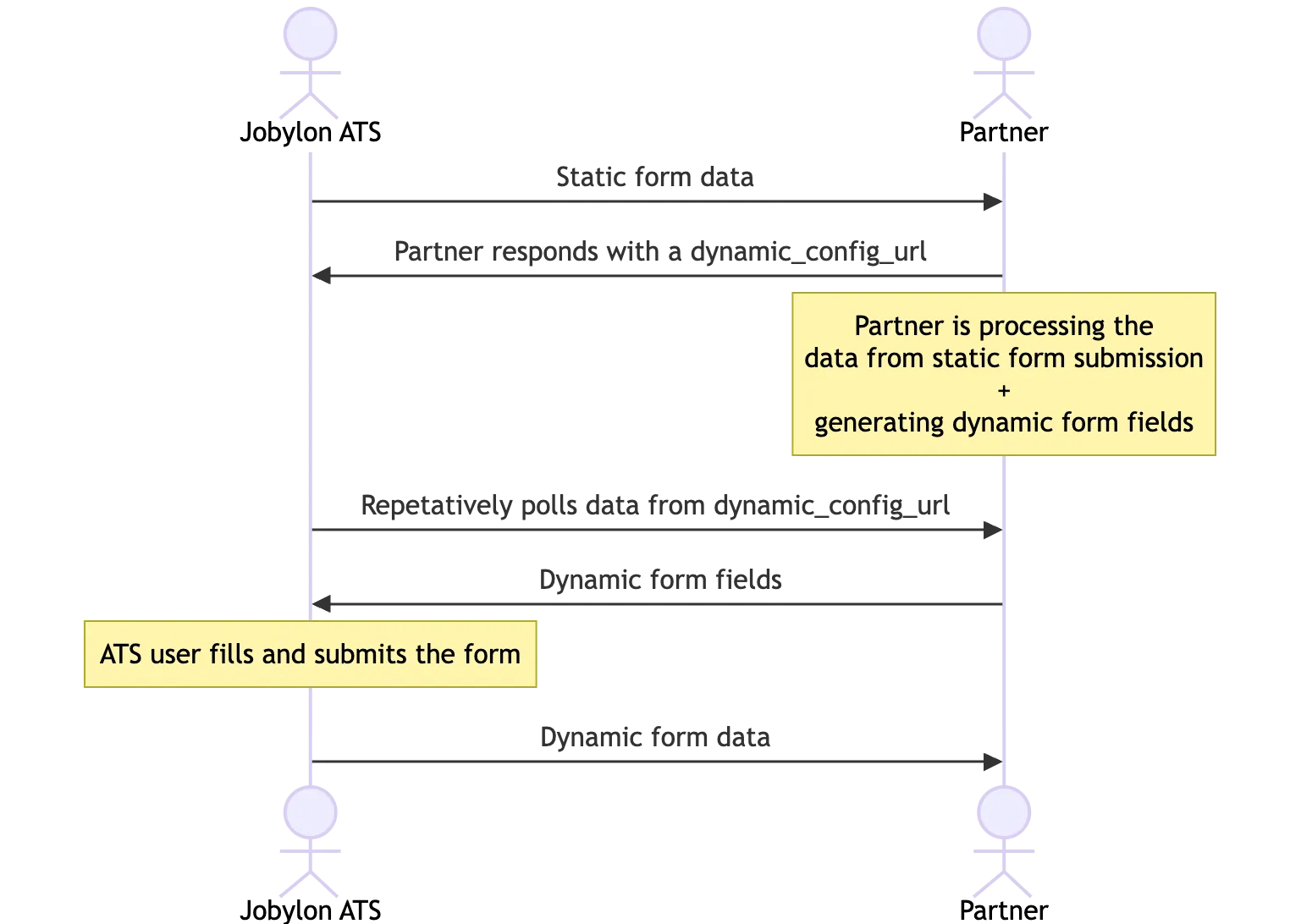
Workflow
Static Form
When using Dynamic Custom Fields, once the user submits the first form, Jobylon ATS will immediately send a Job Webhook to the partner, as described in Webhookshere. This webhook will include, among other fields, the following:
Name | Content | Description |
|---|---|---|
event_type | job | Webhook type identifier |
action | create/update | Webhook action |
settings | object | Object containing the user answers to the first (static) form |
dynamic_settings | null | Object containing the user answers to the second (dynamic) form. null in the first webhook |
Jobylon expects an immediate response to this webhook. The response must return a 200 status code and a JSON including a URL where Jobylon can access the dynamic fields.
Response example:
The ATS will attempt to access the returned URL up to 5 times, with a 3-second interval between each attempt. Once the form is available, Jobylon ATS will show it to the user. If the form is still unavailable after the fifth attempt, an error message will be displayed to the user and the flow is interrupted.
Dynamic Form
Jobylon expects the dynamic form to be present in the returned URL, in JSON format. All the fields must be within the fields object and follow the exact same structure as shown in Api Reference/OpenAPIapi for Job Config. For example:
Once the user saves the secondary (dynamic) form, Jobylon ATS sends a second webhook to the partner with the following fields:
Name | Content | Description |
|---|---|---|
event_type | job | Webhook type identifier |
action | dynamic_update | Webhook action |
settings | null | Object containing the user answers to the first (static) form. null in the second webhook |
dynamic_settings | object | Object containing the user answers to the second (dynamic) form. |