Adding data to the candidate
After receiving the candidate webhook, you can use the candidate ID to post data back into Jobylon for display in the candidate profile page.
For more details, see the /candidates/{candidate_id}/result in the Api Reference/OpenAPI
Example
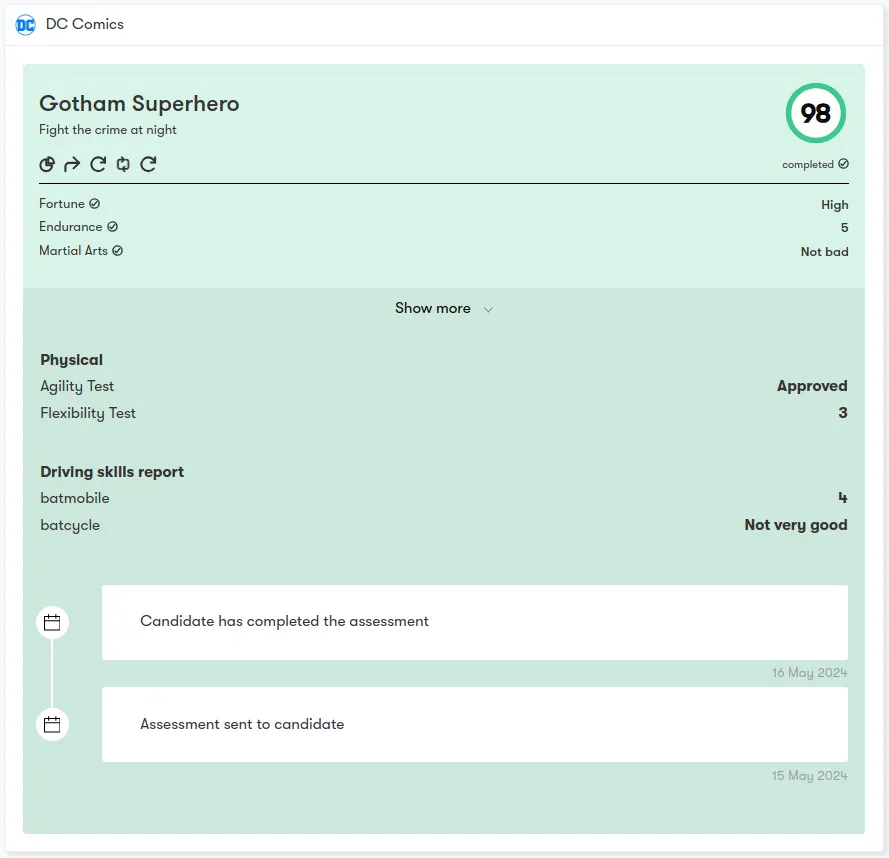
The payload below yields the following candidate card for your integration. This card will present on the application detail page.
{
  "result": {
    "title": "Gotham Superhero",
    "subtitle": "Fight the crime at night",
	"color": "green",
    "score": 98,
    "status": "completed",
    "links": [
	  {
        "title": "Data",
        "url": "https://www.jobylon.com",
        "icon": "chart"
      },
      {
        "title": "More info",
        "url": "https://www.jobylon.com"
      },
			{
        "title": "Reload",
        "url": "https://www.jobylon.com",
        "icon": "reload"
      },

			{
        "title": "Update Candidate",
        "url": "https://www.jobylon.com",
        "icon": "update"
      }
    ],
    "content": [
      {
        "title": "Physical",
        "details": [
          {
            "title": "Agility Test",
            "value": "Approved"
          },
					{
            "title": "Flexibility Test",
            "value": 3
          }
        ],
        "status": "awaiting"
      },
			{
        "title": "Driving skills report",
        "details": [
          {
            "title": "batmobile",
            "value": 4
          },
					{
            "title": "batcycle",
            "value": "Not very good"
          }
        ]
      }
    ],
    "scores": [
      {
        "title": "Fortune",
        "value": "High"
      },
			{
        "title": "Endurance",
        "value": "5"
      },
			{
        "title": "Martial Arts",
        "value": "Not bad"
      }
    ]
  }
}
Logs
Despite being part of the card, logs are added via a dedicated endpoint. For logs, please check /candidates/{candidate_id}/logs in the Api Reference/OpenAPI