Job URL redirect
Allow Jobylon job URLs to seamlessly redirect candidates to externally hosted career site pages.
Overview
The Job URL Redirect feature enables companies to host their job pages on their own CMS or career site while continuing to use Jobylon ATS for recruitment workflows and candidate tracking.
When enabled, all public job URLs redirect candidates to a corresponding external job page based on a configurable URL pattern.
This allows career site builders and CMS integrations to:
- Own the candidate-facing job experience
- Control SEO and branding
- Serve jobs from external infrastructure
- Continue using Jobylon as the ATS backend
How It Works
Jobylon can redirect traffic to one configured destination pattern.
The redirect URL is dynamically generated using identifiers associated with the job being viewed.
Supported identifiers include:
- Job ID
- Company ID
- Job language
Important Architectural Principle
Jobylon only controls:
- The destination URL pattern
- The identifiers included in the redirect
Jobylon does not control:
- How the external career site structures its pages
- Internal routing on the client side
- Additional redirects after the initial redirect
- CMS-specific logic
Think of it like package delivery:
- Jobylon provides the destination address and package metadata
- The career site decides how to process and route the visitor internally
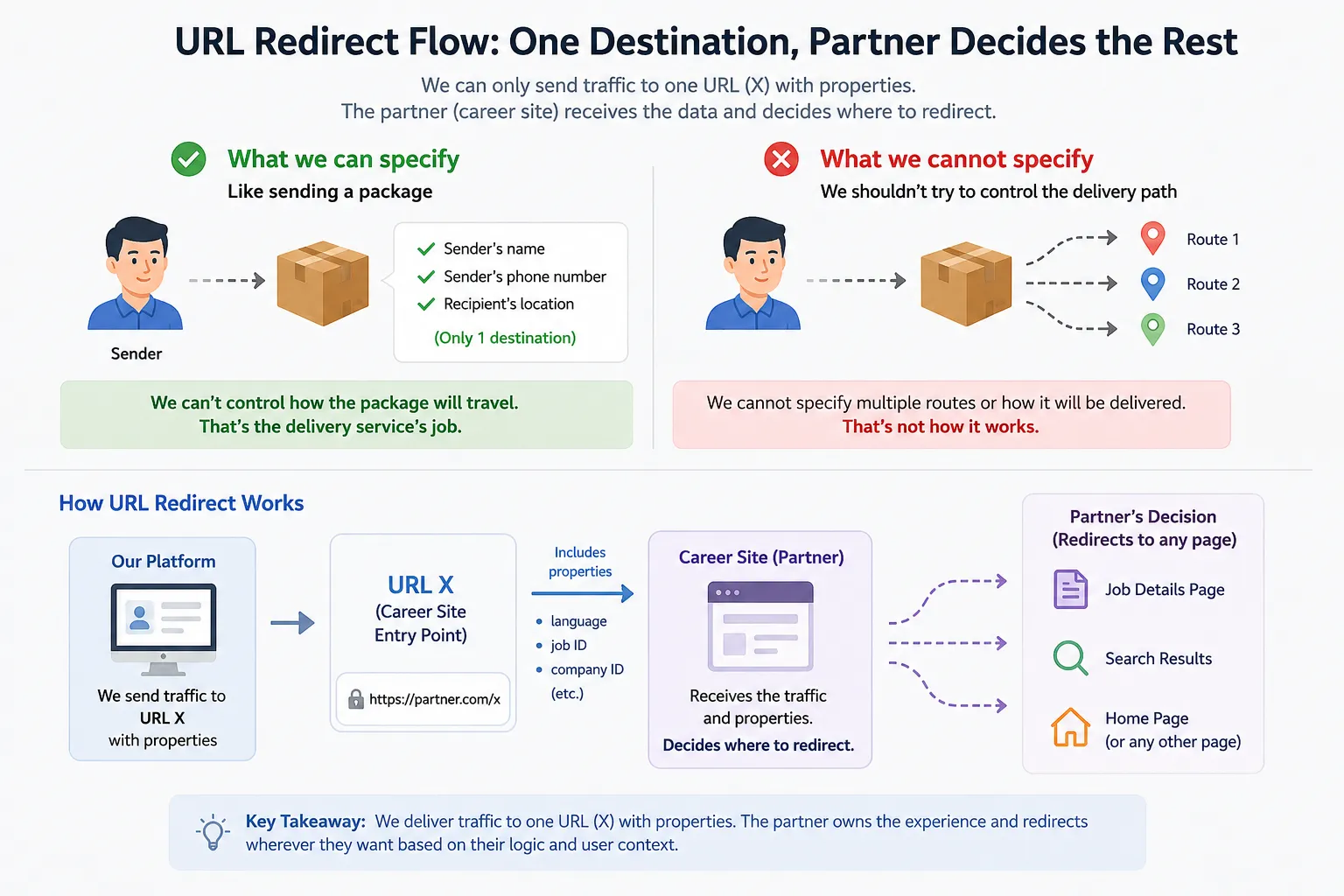
Redirect Flow
Example Flow
- A candidate visits a public Jobylon job URL
https://emp.jobylon.com/jobs/8471-software-engineer/
- Jobylon generates a redirect URL using the configured pattern
https://company.com/jobs/{{ job_id }}
- Placeholders are replaced with job-specific values
https://company.com/jobs/8471?source=jobylon
- The candidate is redirected to the external career site
- The external career site handles:
- Page rendering
- Internal routing
- Localization
- Additional redirects
- SEO handling
Supported Placeholders
The redirect pattern supports the following placeholders:
| Placeholder | Description |
{{ job_id }} - The Jobylon job ID
{{ company_id }} - The Jobylon company ID
{{ job_language }} - The language code associated with the job
No other placeholders are supported.
Pattern Examples
Given:
- job_id = 8471
- company_id = 356
- job_language = nl
Redirect Pattern | Final Redirect URL
https://company.com/jobs/{{ job_id }} | https://company.com/jobs/8471
https://company.com/company/{{ company_id }}/jobs/{{ job_id }} | https://company.com/company/356/jobs/8471
https://company.com/jobs/{{ job_language }}/{{ job_id }} | https://company.com/jobs/nl/8471
https://company.com/jobs/?job={{ job_id }} | https://company.com/jobs/?job=8471
https://company.com/jobs/#{{ job_id }} | https://company.com/jobs/#8471
https://company.com/jobs/?utm_source=jobylon#{{ job_id }} | https://company.com/jobs/?utm_source=jobylon#8471
Responsibilities of the Career Site
The external career site or CMS integration is responsible for:
- Hosting job pages
- Synchronizing jobs from Jobylon
- Resolving Jobylon identifiers
- Rendering job content
- Handling missing jobs
- Managing localization
- Managing SEO
- Handling internal redirects
Recommended Implementation
Career site builders should:
- Sync jobs from Jobylon into their platform
- Store Jobylon identifiers
- Generate stable external URLs
- Resolve incoming identifiers to internal content
- Gracefully handle missing or unpublished jobs
Handling Missing Jobs
There may be situations where the external career site has not yet synchronized a job from Jobylon.
Examples include:
- Newly created jobs
- Draft jobs
- Delayed synchronization
- Jobs excluded from publishing
In these cases, the external site may return:
- 404 pages
- Placeholder content
- Redirects to listings pages
This behavior should be handled by the career site implementation.
Redirect Scope
Redirects apply only to public job pages.
Preview and internal editing pages are excluded.
Skip Filters
Jobylon supports optional filters to exclude specific jobs from redirect behavior.
Examples include:
- Hidden jobs
- Internal jobs
- Confidential jobs
Best Practices for Career Site Builders
Use Stable URLs
Avoid changing external job URLs after publication.
Store Jobylon IDs
Always persist:
- Job ID
- Company ID
- Language
These identifiers are critical for redirect resolution.
Support Graceful Fallbacks
If a job cannot be resolved:
- Show a helpful 404 page
- Redirect to open positions
- Provide search functionality
Preserve Tracking Parameters
Maintain UTM and campaign parameters through internal routing.
Summary
The Job URL Redirect feature enables companies to fully own the candidate-facing job experience while continuing to use Jobylon ATS operationally.
Jobylon’s responsibility is limited to:
- Redirecting traffic to one destination pattern
- Providing job-specific identifiers
The external career site is responsible for:
- Resolving identifiers
- Rendering pages
- Managing routing and UX
This separation keeps the integration flexible, scalable, and CMS-agnostic.